
fascinating-indigo•2y ago
email validation
can somebody please help me to validate the email perfectly step by step
let email = "{last_utterance}"; // replace with the variable that holds the user's input
let emailRegex = /^[^\s@]+@[^\s@]+.[^\s@]+$/;
if (emailRegex.test(email)) {
// The email is valid
} else {
// The email is not valid
} it is always going to valid stage irrespective of adding invalid state
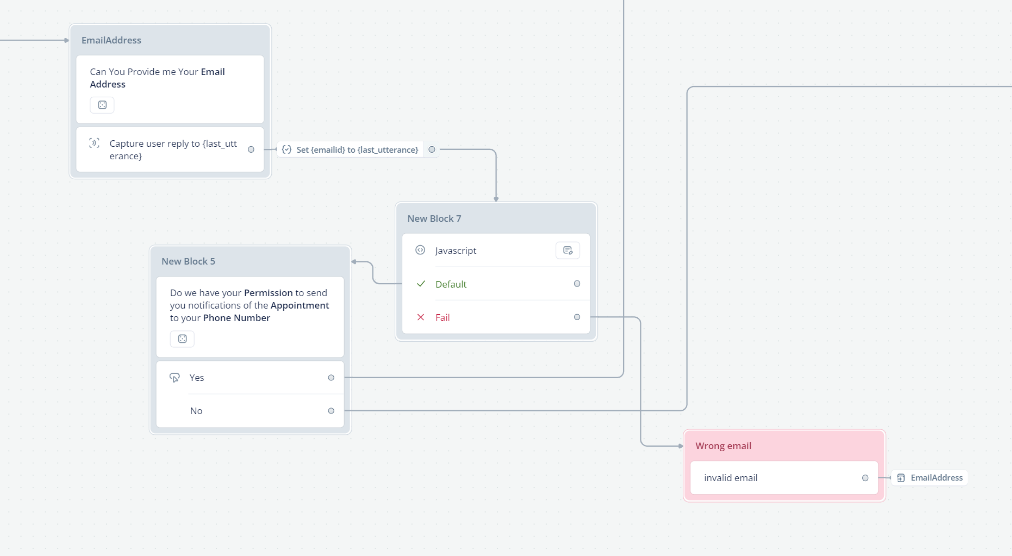

6 Replies
To validate an email address in JavaScript, you can use a regular expression (regex). Here is a step-by-step guide to ensure your validation works correctly:
1. Define the email variable: This should hold the user's input.
2. Create the regex pattern: This pattern will match valid email formats.
3. Test the email against the regex: Use the
test method to check if the email matches the pattern.
Here is the corrected code:
Explanation:
- Regex Pattern: /^[^\s@]+@[^\s@]+\.[^\s@]+$/
- ^[^\s@]+: Ensures the email starts with one or more characters that are not spaces or @.
- @[^\s@]+: Ensures there is an @ followed by one or more characters that are not spaces or @.
- \.[^\s@]+$: Ensures there is a . followed by one or more characters that are not spaces or @, and ends the string.
Common Pitfalls:
- Ensure that the variable email correctly holds the user's input.
- Make sure there are no leading or trailing spaces in the email input.
This should correctly validate the email and handle both valid and invalid cases.fascinating-indigoOP•2y ago
its still not working
fascinating-indigoOP•2y ago


adverse-sapphire•2y ago
Disclaimer--just learning JS, but your screenshot shows an "i" which Tico does not. Maybe the issue?

fascinating-indigoOP•2y ago
Thanks for replying actually I made this case insensitive that's the reason I inserted i keyword which will make the email case insensitive
@blackrider46 I've sent you a DM.
