
other-emerald
other-emerald2y ago

Impossible to integrate voiceflow with Teams

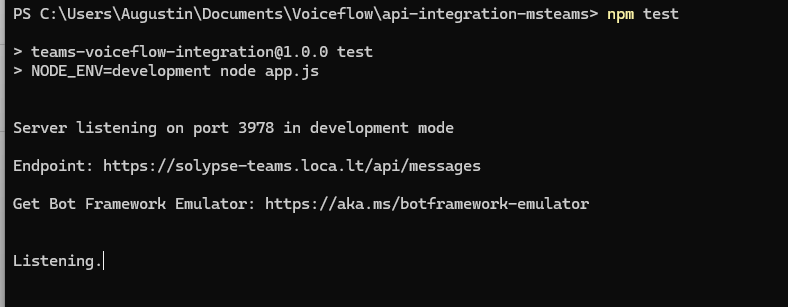
Hi everyone, I have tried to integrate Voiceflow inside Microsoft Teams. I have followed the documentation here : https://github.com/voiceflow-gallagan/api-integration-msteams/tree/e7a30eb4164fc5fbe097f2d1d7e82746d383f1d8 This documentation is easily understandable and I went through it However, I fail publishing it and testing it locally. The server is running, but it is impossible to connect to it through Bot Framework Emulator. It seems to be a networking/firewall problem but I can't solve it. I am running on Windows 11. Does anyone have an idea on how to solve that ? Thanks in advance,
No description
31 Replies
other-emerald
other-emeraldOP2y ago
When I connect I get the error the bot's microsoft app id or microsoft app password is incorrect However I have checked that in the .env file and in Teams those are the same ID and Password, I even generated a new key to be sure
No description
other-emerald
other-emeraldOP2y ago
I even connected to Chrome and noticed that it is running, even though it does not allow connection
No description
other-emerald
other-emeraldOP2y ago
sometimes the application crashes in the terminal with those logs (sorry, I am no discord expert, I hope the texte is correctly formatted ) : node:events:497 throw er; // Unhandled 'error' event ^ Error: connection refused: localtunnel.me:34221 (check your firewall settings) at Socket.<anonymous> (C:\Users\Augustin\Documents\Voiceflow\api-integration-msteams\node_modules\localtunnel\lib\TunnelCluster.js:52:11) at Socket.emit (node:events:519:28) at emitErrorNT (node:internal/streams/destroy:169:8) at emitErrorCloseNT (node:internal/streams/destroy:128:3) at process.processTicksAndRejections (node:internal/process/task_queues:82:21) Emitted 'error' event on Tunnel instance at: at TunnelCluster.<anonymous> (C:\Users\Augustin\Documents\Voiceflow\api-integration-msteams\node_modules\localtunnel\lib\Tunnel.js:96:12) at TunnelCluster.emit (node:events:519:28) at Socket.<anonymous> (C:\Users\Augustin\Documents\Voiceflow\api-integration-msteams\node_modules\localtunnel\lib\TunnelCluster.js:50:14) at Socket.emit (node:events:519:28) [... lines matching original stack trace ...] at process.processTicksAndRejections (node:internal/process/task_queues:82:21) Wow, I learn that this solution no longer is possible : https://developer.voiceflow.com/docs/microsoft-teams I am really angry because I spent some time trying to have it working and it is not written that it is deprecated
W. Williams (SFT)
@NiKo | Voiceflow
probable-pink
probable-pink2y ago
I have the same issue brother @Augustin We would really love to get some help for this integration, because our client is waiting. @NiKo | Voiceflow 🫶
other-emerald
other-emeraldOP2y ago
If I read correctly direct integration is no more possible, and the solution would be to build a Teams app and incorporate the API "from scratch" but do not hesitate to correct me if I am wrong
probable-pink
probable-pink2y ago
Yes, but the issue that we have is that we are not able to test the app locally, because of the same problem you encountered as well.
other-emerald
other-emeraldOP2y ago
I think this error is because direct integration is no more possible
probable-pink
probable-pink2y ago
If you followed Gallagans git repository then you were building the ms teams app. The direct integration is a legacy function - so it is no longer available.
other-emerald
other-emeraldOP2y ago
Please note : I am not a developer myself, more of an integrator, and even though I am able to run commands and follow steps I do not have the coding/microsoft teams knowledge then I will follow Niko's answer @NiKo | Voiceflow @W. Williams (SFT) Did you have time to study this ?
W. Williams (SFT)
I have no clue. I have never dealt with MS Teams
other-emerald
other-emeraldOP2y ago
Sorry, I thought you knew
fair-rose
fair-rose2y ago
@Augustin hey, i was working on this with @Samso and we figured out how to fix it. so we found this guide on stack overflow and we were getting the same problem with authorization: https://stackoverflow.com/questions/71031057/microsoft-bot-framework-bot-missing-from-bot-framework-tenant-how-to-add
other-emerald
other-emeraldOP2y ago
Hi Alex, I am pleased to read you !
fair-rose
fair-rose2y ago
but only thing we have differently setup from you is that we run the code on Replit and is hosted remotly but you can try it and it might work but when you'll be going through microsoft services they renamed the Active Azure Directory to Microsoft Entra ID. So go to Microsoft Entra ID -> Manage, App registrations -> Go to your app -> Authentication -> Supported account types there you want to try to switch it to multitenant save it and then back to single tenant and save again and after that the bot started working on teams so let me know if it works for you or need any help with it
other-emerald
other-emeraldOP2y ago
I will try that, thanks for your advice I do not see the app that I created (in Teams) in the list available from Entra ID/App registration
other-emerald
other-emeraldOP2y ago
Is there an extra step to publish it ? It says "sent"
No description
other-emerald
other-emeraldOP2y ago
when I go to https://admin.teams.microsoft.com/policies/manage-apps I see the app available for everyone
No description
other-emerald
other-emeraldOP2y ago
Plus it does not work locally, I am not sure changing the Azure AD parameters could change that ? @gg @Samso ?
fair-rose
fair-rose2y ago
Well we faced the same issue as on the picture you posted, and i've found that they have some bug where the authorization doesn't work properly and you can fix it by switching the single / multi tenant option in the setings and i've just tried running the Gallagans code plus the emulator on localhost and it works correctly
fair-rose
fair-rose2y ago
No description
fair-rose
fair-rose2y ago
As you can see the first debug message it's connecting to localhost And yes you have to publish it That should be done here: https://admin.teams.microsoft.com On the site you go to Teams Apps -> Managing Apps -> Search for your app -> Open it -> Publish Not sure if the categories are called exactly like that since i have it in my language but it should something similar But currently we are facing another issue where the buttons don't get recognized and i've tried creating a post here but no one responded yet. So if you get it working please let me know!
fair-rose
fair-rose2y ago
No description
fair-rose
fair-rose2y ago
So we see it here and there we can change the setting But maybe we've done something that added the app here but I'm not sure exactly what since we've tried a lot of things
other-emerald
other-emeraldOP2y ago
hmmm... the app is there but I see nothing in the App registrations
No description
other-emerald
other-emeraldOP2y ago
No description
other-emerald
other-emeraldOP2y ago
I have sorted the apps by creation date ; it is definitely not there
No description
other-emerald
other-emeraldOP2y ago
I managed to include an iframe-like inside Teams but that is not really what I want : I would like the users to have authentication/know who they are
other-emerald
other-emeraldOP2y ago
using the Website component
No description
fair-rose
fair-rose2y ago
That's cool but i get you. Unfortunetally i can't help you more since i'm a begginer in Microsoft services
other-emerald
other-emeraldOP2y ago
ok, thanks anyway for your answer

Did you find this page helpful?
