Using Voiceflow to write user response to Gsheet using API block
Hi all,
I'm super new to the community as well as any level of coding and AI. This may be super straightfoward for some and I sincerely appreciate your help.
What I want to do:
Step 1: Voiceflow chat will prompt user to enter name
Step 2: User enters name
Step3: Write name to google sheet, with timestamp.
Here's what I have set up:
Step 1: Super straight forward with Prompt Block.
Step 2: User enters name:
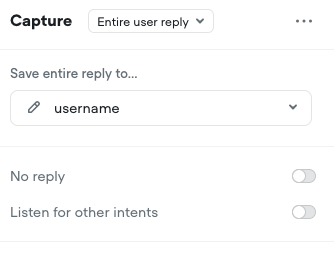
I have a Capture block that saves the entire reply to 'username'. I believe this is a preset variable (I don't seem to have the ability to change anything about this variable)
Step 3: Write to Google Sheet:
A. Apps Script: I used the Apps Script to be able to POST data into the Gsheet: Code here
const SHEET_NAME = 'Sheet1';
function doPost(e) {
try {
// Parse the incoming JSON
const payload = JSON.parse(e.postData.contents);
const userName = payload.username;
//Assuming username is the variable in the payload.
// Open the sheet and append the new row
const SPREADSHEET_ID = 'IDRedacted'; // the ID from your sheet’s URL
const ss = SpreadsheetApp.openById(SPREADSHEET_ID);
const sheet = ss.getSheetByName(SHEET_NAME);
sheet.appendRow([new Date(),userName ]);
// Return a success response
return ContentService
.createTextOutput(JSON.stringify({ status: 'OK' }))
.setMimeType(ContentService.MimeType.JSON);
}
}
B. API Block in Voiceflow
Type: POST
URL from my deployed Apps Script
Header: Content-Type
Value: application/json
no parameters
Body - Raw - Json
{
"name": {username}
}
Question: In my Apps Script:
When I have const userName = payload.username;
Nothing gets written to the Gsheet.
When I have const userName = payload.name;
0 gets written to the Gsheet, regardless of what user entered.
How can I save the user's input in Voiceflow chat, into the Gsheet?
I'm super new to the community as well as any level of coding and AI. This may be super straightfoward for some and I sincerely appreciate your help.
What I want to do:
Step 1: Voiceflow chat will prompt user to enter name
Step 2: User enters name
Step3: Write name to google sheet, with timestamp.
Here's what I have set up:
Step 1: Super straight forward with Prompt Block.
Step 2: User enters name:
I have a Capture block that saves the entire reply to 'username'. I believe this is a preset variable (I don't seem to have the ability to change anything about this variable)
Step 3: Write to Google Sheet:
A. Apps Script: I used the Apps Script to be able to POST data into the Gsheet: Code here
const SHEET_NAME = 'Sheet1';
function doPost(e) {
try {
// Parse the incoming JSON
const payload = JSON.parse(e.postData.contents);
const userName = payload.username;
//Assuming username is the variable in the payload.
// Open the sheet and append the new row
const SPREADSHEET_ID = 'IDRedacted'; // the ID from your sheet’s URL
const ss = SpreadsheetApp.openById(SPREADSHEET_ID);
const sheet = ss.getSheetByName(SHEET_NAME);
sheet.appendRow([new Date(),userName ]);
// Return a success response
return ContentService
.createTextOutput(JSON.stringify({ status: 'OK' }))
.setMimeType(ContentService.MimeType.JSON);
}
}
B. API Block in Voiceflow
Type: POST
URL from my deployed Apps Script
Header: Content-Type
Value: application/json
no parameters
Body - Raw - Json
{
"name": {username}
}
Question: In my Apps Script:
When I have const userName = payload.username;
Nothing gets written to the Gsheet.
When I have const userName = payload.name;
0 gets written to the Gsheet, regardless of what user entered.
How can I save the user's input in Voiceflow chat, into the Gsheet?