
How do I wipe out memory?
What I want to do: wipe out both memory and vf_memory
Why: I want to loop back to an agent step, but have that step use new variable values. But apparently, when an agent step is first called, it generates an LLM session that persists permanently. Even if variable values have changed, the agent step sticks with the initial values the second time around. I can see this persistent approach being useful in some situations, but it is counterproductive in others.
Workarounds: Tico suggested duplicating the agent step, or ending the session, but these won't work for me. Duplicating it many times is not scalable. Ending the session means losing other client inputs and starting over.
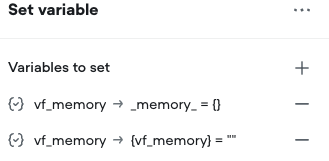
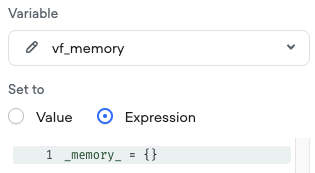
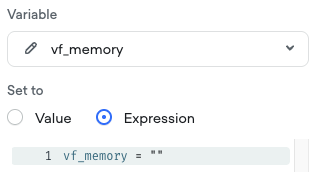
What I tried: Followed Tico's advice to use a Set Expression step with 2 rows. See attached screenshots for its recommended workaround to wipe out memory
What happened: vf_memory gets wiped out, but memory still retains full history
What debug log shows: There is a Debug row saying [Set] 1 variable changed. Variables tab shows vf_memory being wiped out, but memory still is retained
How can I wipe out memory? If I can't loop back to an agent step with a clean session, I think I will have to overhaul my project design (yes I'm an idiot for not discovering this foundational problem earlier)
Why: I want to loop back to an agent step, but have that step use new variable values. But apparently, when an agent step is first called, it generates an LLM session that persists permanently. Even if variable values have changed, the agent step sticks with the initial values the second time around. I can see this persistent approach being useful in some situations, but it is counterproductive in others.
Workarounds: Tico suggested duplicating the agent step, or ending the session, but these won't work for me. Duplicating it many times is not scalable. Ending the session means losing other client inputs and starting over.
What I tried: Followed Tico's advice to use a Set Expression step with 2 rows. See attached screenshots for its recommended workaround to wipe out memory
What happened: vf_memory gets wiped out, but memory still retains full history
What debug log shows: There is a Debug row saying [Set] 1 variable changed. Variables tab shows vf_memory being wiped out, but memory still is retained
How can I wipe out memory? If I can't loop back to an agent step with a clean session, I think I will have to overhaul my project design (yes I'm an idiot for not discovering this foundational problem earlier)

Exclusive community for Voiceflow Solutions Providers & Content Creators.
13,076Members
Resources
Recent Announcements
Similar Threads
Was this page helpful?

