Date & time Stuck
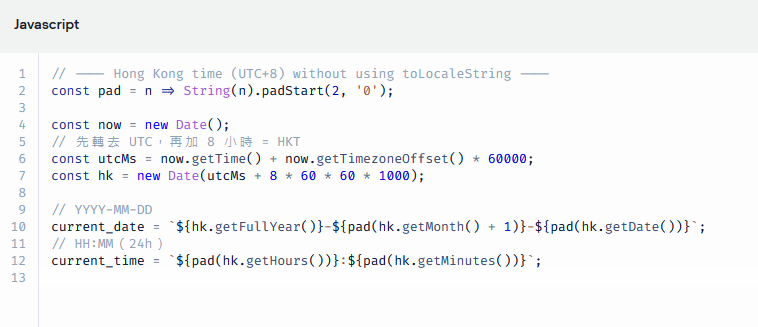
I’m having trouble finalizing my chatbot. It originally worked fine, but after I added a JavaScript code step to capture the current date and time (so these values can be stored in Google Sheets), the flow no longer continues.
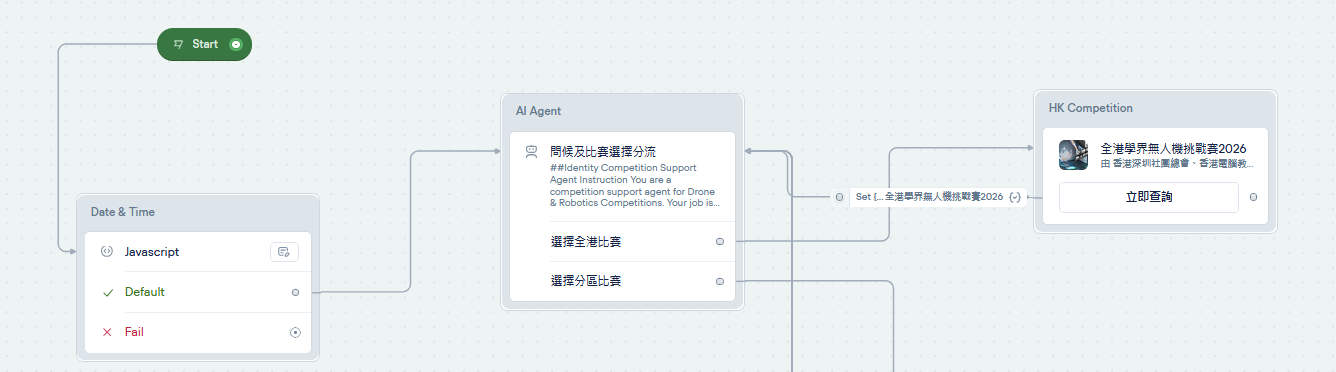
Now, instead of moving on to check the knowledge base and answer user questions, the chatbot gets stuck immediately after the user makes a selection from the carousel.
My intended flow is: Greeting → Carousel choices → User selection → Brief intro → User question → KB lookup.
However, once the date/time script was added, the flow never reaches the brief intro.
Could you please advise how to properly implement date/time capture in a Code Step so the flow continues as expected?
i also share the java script and the flow in pics. see if anyone can help?
Now, instead of moving on to check the knowledge base and answer user questions, the chatbot gets stuck immediately after the user makes a selection from the carousel.
My intended flow is: Greeting → Carousel choices → User selection → Brief intro → User question → KB lookup.
However, once the date/time script was added, the flow never reaches the brief intro.
Could you please advise how to properly implement date/time capture in a Code Step so the flow continues as expected?
i also share the java script and the flow in pics. see if anyone can help?