
Help! Add to sheet tool in AI block keeps giving "expected array" error
Hey everyone,
I'm completely stuck on something and hoping someone can help.
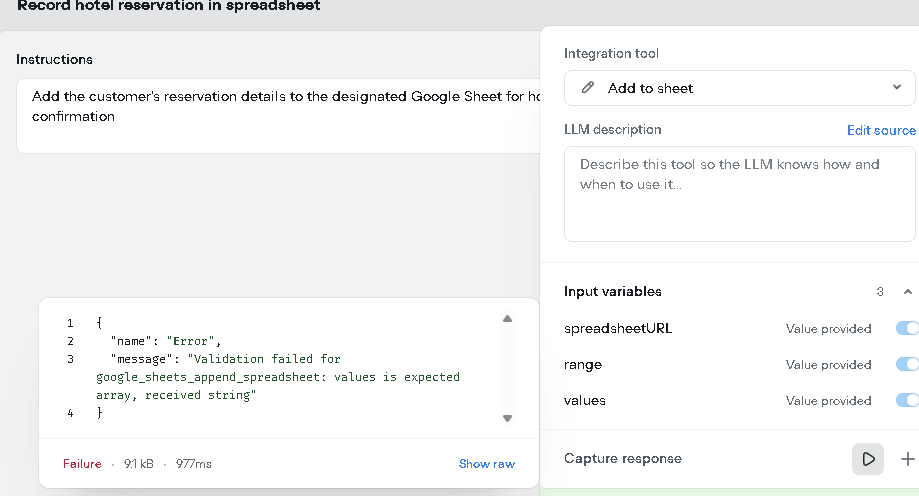
I'm using one of the new AI-generated "Model" blocks to handle my hotel reservations. Inside this block, I'm using the Sayfaya ekle (Add to sheet) tool to send the data to Google Sheets.
No matter what I do, it fails every single time with this error: "Validation failed for google_sheets_append_spreadsheet: values is expected array, received string"
It seems like the block is always trying to send my data as a single piece of text (string) instead of a list (array), and Google Sheets isn't accepting it.
Here's what I've tried:
Prompting the AI: I've told the AI in the "Instructions" box to specifically create a "SYSTEM ARRAY" (a list) with variables like {Full name}, {Email}, etc., and send that list to the values parameter. Still get the error.
Using the "Default value" box: I tried forcing it by putting [{Full name}, {telephone number}, ...] directly into the "Varsayılan değer" box. Still the same error.
Manual Inputs: I tried turning off the blue "AI" toggle for the URL and menzil (sheet name) and filling them in by hand, leaving only the values toggle on "AI". That also didn't work.
I'm starting to think this Add to sheet tool is just buggy when it's inside an AI Model block, because the normal, manual Google Sheets block (the separate one from the Dev menu) works fine.
Am I missing something obvious? How are you supposed to send a list of variables to the values field from inside this AI block?
Thanks for any help!
I'm completely stuck on something and hoping someone can help.
I'm using one of the new AI-generated "Model" blocks to handle my hotel reservations. Inside this block, I'm using the Sayfaya ekle (Add to sheet) tool to send the data to Google Sheets.
No matter what I do, it fails every single time with this error: "Validation failed for google_sheets_append_spreadsheet: values is expected array, received string"
It seems like the block is always trying to send my data as a single piece of text (string) instead of a list (array), and Google Sheets isn't accepting it.
Here's what I've tried:
Prompting the AI: I've told the AI in the "Instructions" box to specifically create a "SYSTEM ARRAY" (a list) with variables like {Full name}, {Email}, etc., and send that list to the values parameter. Still get the error.
Using the "Default value" box: I tried forcing it by putting [{Full name}, {telephone number}, ...] directly into the "Varsayılan değer" box. Still the same error.
Manual Inputs: I tried turning off the blue "AI" toggle for the URL and menzil (sheet name) and filling them in by hand, leaving only the values toggle on "AI". That also didn't work.
I'm starting to think this Add to sheet tool is just buggy when it's inside an AI Model block, because the normal, manual Google Sheets block (the separate one from the Dev menu) works fine.
Am I missing something obvious? How are you supposed to send a list of variables to the values field from inside this AI block?
Thanks for any help!

Exclusive community for Voiceflow Solutions Providers & Content Creators.
13,076Members
Resources
Recent Announcements
Similar Threads
Was this page helpful?





