
Voiceflow isn't recognizing entities
I'm simultaneously experiencing 2 issues:
- Voiceflow isn't recognizing entities on the first try
- Voiceflow isn't reprompting for missing entities
Screenshot images of the chat and logs are in the attached images.
There are 4 entities:
- knee_side: left knee, right knee, both
- symptom_description: hurts, aches, numbness, tingling...
- symptom_activity: run, walk, squat, bend, straighten...
- symptom_location: back_knee, front_knee, behind_knee...
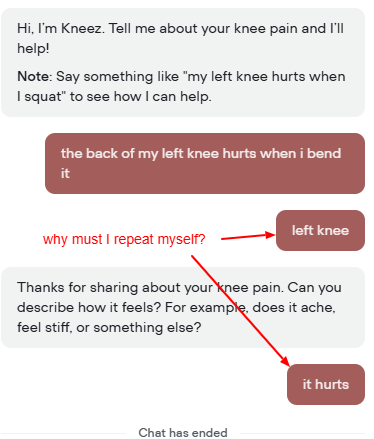
The prompt: "the back of my left knee hurts when I bend it"
The prompt contains all 4 required entities:
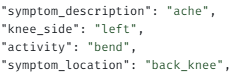
"symptom_description": "ache",
"knee_side": "left",
"activity": "bend",
"symptom_location": "back_knee",
But Voiceflow only recognizes 2 of them on the first try: activity and symptom_location.
Instead of continuing the flow, Voiceflow gets hung up. In the logs, it shows:
Fill "knee_side_entity"
But the chat window doesn't show a reprompt. Instead, it displays nothing.
So I type in "left knee" then the flow continues. It then asks me for a symptom description. I say "it hurts". Then the flow resumes.
All 4 of the required entities were contained in the original prompt. So why is Voiceflow only recognizing 2 of them on the first prompt? And when it needs a knee_side entity, why is it being silent instead of sending a message to the chat window?
- Voiceflow isn't recognizing entities on the first try
- Voiceflow isn't reprompting for missing entities
Screenshot images of the chat and logs are in the attached images.
There are 4 entities:
- knee_side: left knee, right knee, both
- symptom_description: hurts, aches, numbness, tingling...
- symptom_activity: run, walk, squat, bend, straighten...
- symptom_location: back_knee, front_knee, behind_knee...
The prompt: "the back of my left knee hurts when I bend it"
The prompt contains all 4 required entities:
"symptom_description": "ache",
"knee_side": "left",
"activity": "bend",
"symptom_location": "back_knee",
But Voiceflow only recognizes 2 of them on the first try: activity and symptom_location.
Instead of continuing the flow, Voiceflow gets hung up. In the logs, it shows:
Fill "knee_side_entity"
But the chat window doesn't show a reprompt. Instead, it displays nothing.
So I type in "left knee" then the flow continues. It then asks me for a symptom description. I say "it hurts". Then the flow resumes.
All 4 of the required entities were contained in the original prompt. So why is Voiceflow only recognizing 2 of them on the first prompt? And when it needs a knee_side entity, why is it being silent instead of sending a message to the chat window?
Voiceflow_Transcript__Logs.pdf136.61KB


