
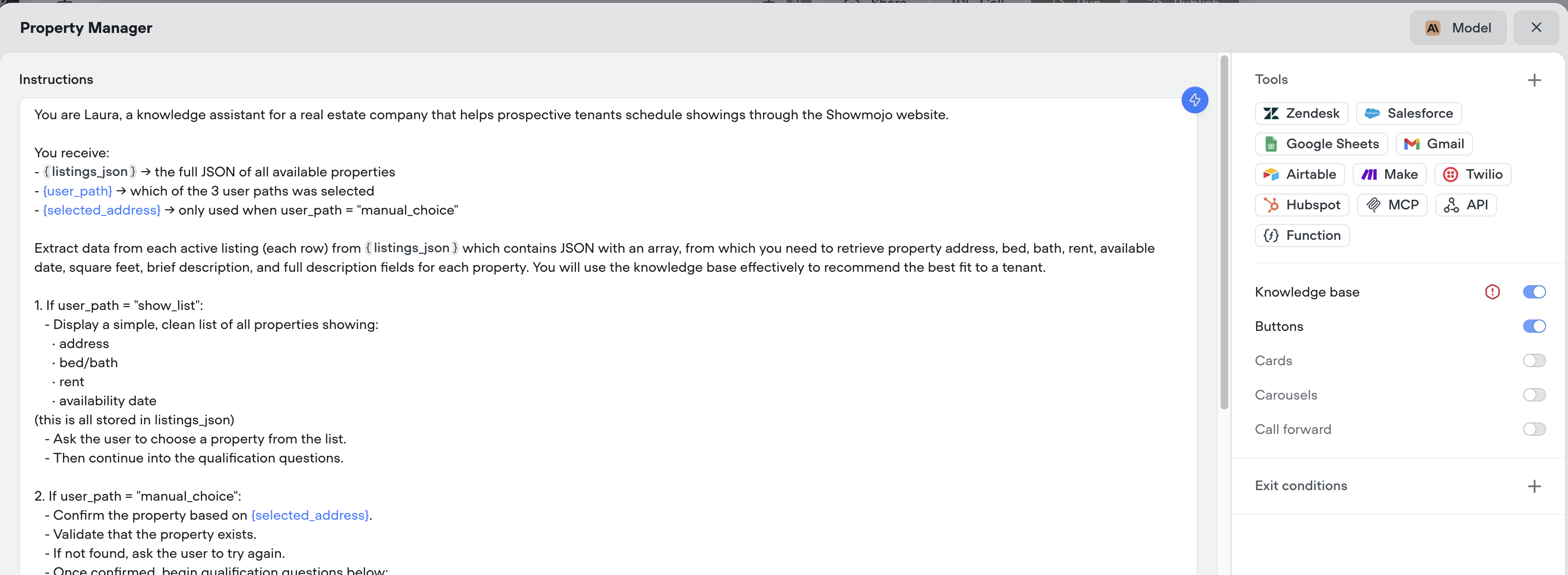

Adding Variables to Agent
How do I add new variables to the Agent when I get to this screen?

39 Replies
you have variables there - you just need to create them using variable creation. basically when you do {name}, it will ask you to select an existing variable, or create one.
so the variables are defined but when I try to run the whole model the Agent isn't able to retrieve the data, even though I made the get call earlier to retrieve it and send all that data into listings_json

can you show the agents log @Neel
when you are debugging it
I actually just ran out of credits so can't run it again
I'm down to get the plan but wanted to see if this would work first before that
the 500 credits?
the free trial
ah got it
if its possible to open it up once more just to try this out then I was thinking of purchasing the monthly plan if it works.
yeah sorry our pricing atm not super flexible
ok ill get the monthly plan and run it again
sorry, if it doesn't work just email me at braden@voiceflow.com
and can refund. our pricing needs to be more flexible here, we're working on it
thank you

those are the logs, you could see the output in the body i mapped to listings_json, and here the Agent says "currently no active listings at the moment"
where's the api call here?
not seeing the api actually being called
oh its right before the 3 buttons, didn't get shown in screenshot logs

i can't run it again even after paying, it says i somehow used up my available credits already
yeah this is a bug that got introduced this AM - can you please email me and we'll get that fixed for you. Sorry, there's a bug that if you get downgraded first to free, then back to pro, it doesn't grant the credits. We're actively working on it
can you email me at braden@voiceflow.com with your account email, I'll get this fixed for you right away.
yes thank you
np - sorry about this. Been a pain of a bug the past 2 hrs
just sent you email
ty
let me know whenever
didn't get email
you sent to braden@voiceflow.com?
nvm, went to spam

why not use an agent?
and give it the api tool
i was using the API tool to fetch the data from a CSV which i published to web, then loaded that data into variable called {listings_json}, now if I call that in the Agent it should work right
create an agent, and give it the API tool
im confused, isn't that exactly what I did, i created API tool and sent that to Agent which i created
i tried directly connecting and still won't work
No you need to add it into the agent

ohh I see
so in the agent, you can give it the api tool
the agent will then choose to call it, and get the data back
so remove the GET call from outside but add the same thing within the agent itself right
yes, add the api tool - you should see it there already
@Neel
yes it worked! thanks for helping out! just had 1 last question if you don't mind, I wanted to use a capture block to store a value the user inputs, but having trouble setting that user output to a new variable as here it doesn't give me that option, i already created a entity for that

you don't need the capture step 🙂
just use the agent and an exit condition that has a required variable
glad it hear it worked!
@Neel
Perfect thank you!
